This site uses cookies to only capture URL parameters, count visitor number, share functions and etc.
Please visit ECS's
Privacy Policy
for further information.
By continue browsing our website, you are hereby aware of and agree on ECS' use of cookies by clicking 'ok'.
OK
Elitegroup Computer Systems
支持
销售据点
Motherboard
Intel Platform
AMD Platform
SoC Solution
Q470H6-M6
H410H6-M7
H410H6-M2
笔记本电脑
Commercial Notebook
Education PC
2 in 1 Notebook
Smart Education Solution
系统
全功能
Small Form Factor
PCoS
LIVA
LIVA Z3E Plus
LIVA One H410
LIVA One A320
IoT
Gateway
Solution Ready Platform (SRP)
Ai Accelerator card
Virtual Personal Assistant
Smart Logistics
Smart Logistics
(CSCG Series)
LoRa Gateway (GWS-BTI2-LR)
AIOT
Smart Solution
Network
Wireless Access Point
CMAL100
Download Center
FAQ/General FAQ
一般常问问题
Motherboard
System
Notebook
Desktop PC
Graphics Card
Wireless Charger
技术支援
IPC技术支援
Updates & Upgrades
WHQL 验证
Google OTA
Reporting Security Issues
System
Product Name
Model Version
FAQ Type
Last Update
MCP61M-M3
V7.0/ V7.1
None
2012/04/17
Question Title
在系统下设置屏幕高分辨率后,屏幕会出现闪烁摇曳的症状,请问如何解决?
Answer
在系统下设置屏幕高分辨率后,如果您的屏幕会出现闪烁摇曳的症状,请尝试以下方案解决您的问题.
- 方案,
1. 设置显示器为自动侦测模式.
2. 进BIOS里加载默认值,保存退出.
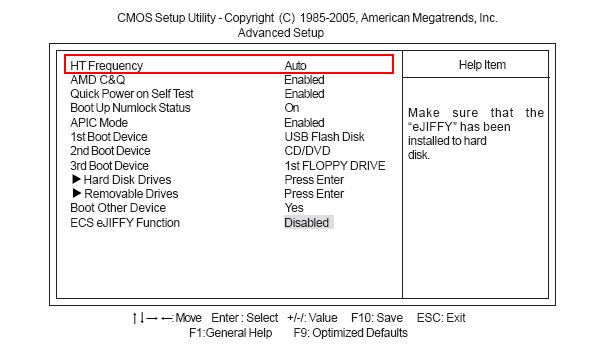
3. 在BIOS里设置 “Advanced Setup\HT Frequency”为"Auto"值,保存退出.
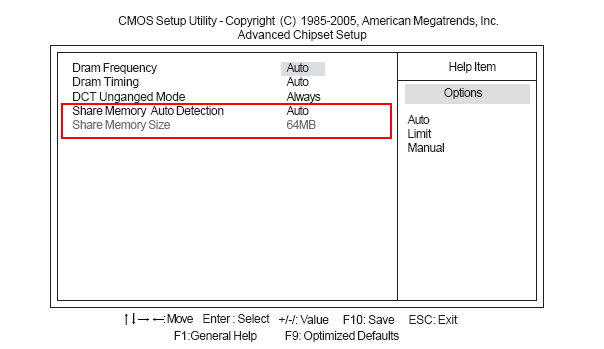
4. 如果BIOS里的 “Share Memory Size”的值为"64/128MB",请设为"256MB",保存退出.
我的系统的前置和后置声卡只有其中一个能工作,请问如何设置让前后置声卡同时工作?
请问MCP61M-M3 V7.1支持哪些CPU?
请问MCP61M-M3 V7.1是否支持AMD Athlon II 250 CPU?
请问MCP61M-M3 V7.1是否支持AMD Phenom II X6 1065T CPU?是否有CPU支持列表可参考?
Menu
Motherboard
Intel Platform
AMD Platform
SoC Solution
笔记本电脑
Commercial Notebook
Education PC
2 in 1 Notebook
系统
全功能
Small Form Factor
PCoS
LIVA
IoT
Gateway
Solution Ready Platform (SRP)
Ai Accelerator card
Virtual Personal Assistant
Smart Logistics