Question Title
我在CMOS里开启"Enhanced Intel SpeedStep Technology(EIST)", 但在Windows XP里CPU频率显示为全速运行,请问在Windows XP下如何设置让EIST工作?
|
Answer
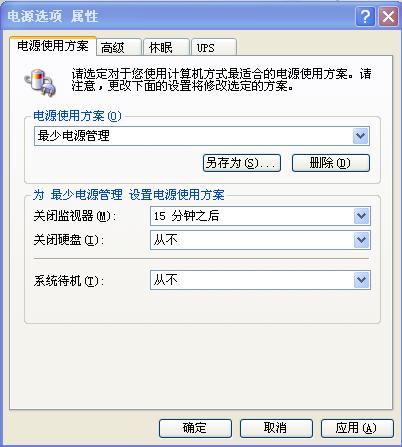
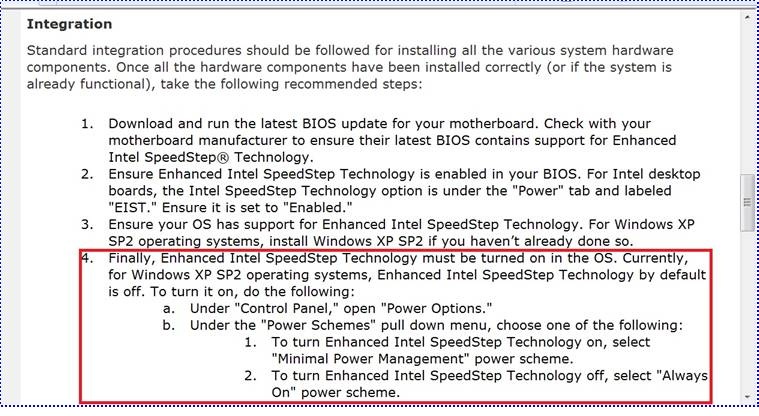
根据Intel 的 "Enhanced Intel SpeedStep Technology - How To Document"规范,让EIST工作,除了需在BIOS里开启EIST,还需在Windows 系统下控制面板/电源管理里把电源使用方案设置为"最少电源管理".
http://www.intel.com/cd/channel/reseller/asmo-na/eng/203838.htm
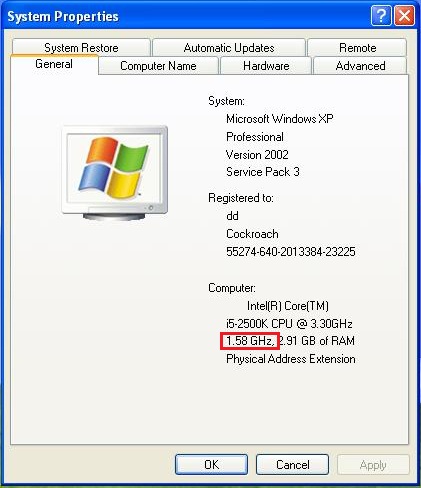
以Intel Core i5-2500K CPU为例,当CMOS里开启EIST,Windows系统下设置电源为最少电源管理,当系统不是满负载运行时,您可看到CPU频率显示为[1.58GHz].这说明EIST可正常工作.
|
|
|
|
|
|